

Home Assistant Tips'n'Tricks
Last modified by Normann P. Nielsen on 2025/12/12 15:13
- Custom Installation
- Renaming Devices etc
- ZenseHome Office Light
- Adding HIK/Trendnet Cams
- NMap
- Sony Songpal discover
- Plex
- BitBucket
- Links
- MQTT
Custom Installation
Upgrade the Home Assistant installation
On my Ubuntu (See https://www.home-assistant.io/docs/installation/virtualenv/)
sudo su -s /bin/bash homeassistant
source /srv/homeassistant/bin/activate
pip3 install --upgrade homeassistant
source /srv/homeassistant/bin/activate
pip3 install --upgrade homeassistant
Update pyatv
sudo su -s /bin/bash homeassistant
source /srv/homeassistant/bin/activate
pip3 install --upgrade pyatv
source /srv/homeassistant/bin/activate
pip3 install --upgrade pyatv
Renaming Devices etc
As stupid as it is, You cant rename via the GUI - this will give:
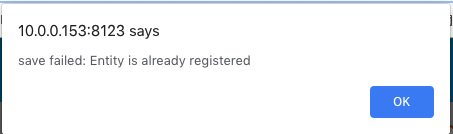
The trick is to edit the file core.entity_registry
cd .storage
vi core.entity_registry
vi core.entity_registry
Change:
{
"config_entry_id": null,
"device_id": null,
"disabled_by": null,
"entity_id": "remote.sovevrelse",
"name": "null,
"platform": "apple_tv",
"unique_id": "9465bb10bf1214d769bd2aca8377aaa5203e09ae3ea4a353a02d80e3e71e149c"
}
"config_entry_id": null,
"device_id": null,
"disabled_by": null,
"entity_id": "remote.sovevrelse",
"name": "null,
"platform": "apple_tv",
"unique_id": "9465bb10bf1214d769bd2aca8377aaa5203e09ae3ea4a353a02d80e3e71e149c"
}
to
{
"config_entry_id": null,
"device_id": null,
"disabled_by": null,
"entity_id": "remote.sovevrelse",
"name": "Apple TV Soveværelse Remote",
"platform": "apple_tv",
"unique_id": "9465bb10bf1214d769bd2aca8377aaa5203e09ae3ea4a353a02d80e3e71e149c"
}
"config_entry_id": null,
"device_id": null,
"disabled_by": null,
"entity_id": "remote.sovevrelse",
"name": "Apple TV Soveværelse Remote",
"platform": "apple_tv",
"unique_id": "9465bb10bf1214d769bd2aca8377aaa5203e09ae3ea4a353a02d80e3e71e149c"
}
And restart Home Assistant
ZenseHome Office Light
See more at ZenseHome API interfacing
switch:
platform: command_line
switches:
office_light:
command_on: /var/turnon-office.exp
command_off: /var/turnoff-office.exp
friendly_name: Office Lights
kitchen_light:
command_on: /var/turnon-kitchen.exp
command_off: /var/turnoff-kitchen.exp
friendly_name: Kitchen Lights
platform: command_line
switches:
office_light:
command_on: /var/turnon-office.exp
command_off: /var/turnoff-office.exp
friendly_name: Office Lights
kitchen_light:
command_on: /var/turnon-kitchen.exp
command_off: /var/turnoff-kitchen.exp
friendly_name: Kitchen Lights
Adding HIK/Trendnet Cams
Install ffmpeg on Linux
apt-get install ffmpeg
Add som config (see https://www.home-assistant.io/components/ffmpeg/):
ffmpeg:
ffmpeg_bin: /usr/bin/ffmpeg
camera 41:
- platform: generic
still_image_url: http://admin:******@10.0.0.140:80/PSIA/Streaming/channels/1/picture
name: Bag hus
- platform: generic
still_image_url: http://admin:******@10.0.0.130:80/PSIA/Streaming/channels/1/picture
name: Fordør
ffmpeg_bin: /usr/bin/ffmpeg
camera 41:
- platform: generic
still_image_url: http://admin:******@10.0.0.140:80/PSIA/Streaming/channels/1/picture
name: Bag hus
- platform: generic
still_image_url: http://admin:******@10.0.0.130:80/PSIA/Streaming/channels/1/picture
name: Fordør
ffmpeg:
ffmpeg_bin: /usr/bin/ffmpeg
camera:
- platform: ffmpeg
input: rtsp://admin:******@10.0.0.140:554/Streaming/Channels/1
name: Bag hus (stream)
- platform: ffmpeg
input: rtsp://admin:******@10.0.0.130:554/Streaming/Channels/1
name: Fordør (stream)
ffmpeg_bin: /usr/bin/ffmpeg
camera:
- platform: ffmpeg
input: rtsp://admin:******@10.0.0.140:554/Streaming/Channels/1
name: Bag hus (stream)
- platform: ffmpeg
input: rtsp://admin:******@10.0.0.130:554/Streaming/Channels/1
name: Fordør (stream)
NMap
apt-get install nmap
sudo setcap cap_net_raw,cap_net_admin,cap_net_bind_service+eip
sudo setcap cap_net_raw,cap_net_admin,cap_net_bind_service+eip /usr/bin/nmap
sudo setcap cap_net_raw,cap_net_admin,cap_net_bind_service+eip
sudo setcap cap_net_raw,cap_net_admin,cap_net_bind_service+eip /usr/bin/nmap
device_tracker:
- platform: nmap_tracker
hosts: 10.0.0.0/24
- platform: nmap_tracker
hosts: 10.0.0.0/24
Sony Songpal discover
songpal discover
Found SRS-X77 - MINT1.9.1
* API version: 1.0
* Endpoint: http://10.0.0.114:54480/sony
* Services:
- Service: guide
- Service: audio
- Service: avContent
- Service: system
Found STR-DN1060 - STR-2015
* API version: 1.0
* Endpoint: http://10.0.0.120:10000/sony
* Services:
- Service: guide
- Service: system
- Service: audio
- Service: avContent
Found SRS-X77 - MINT1.9.1
* API version: 1.0
* Endpoint: http://10.0.0.114:54480/sony
* Services:
- Service: guide
- Service: audio
- Service: avContent
- Service: system
Found STR-DN1060 - STR-2015
* API version: 1.0
* Endpoint: http://10.0.0.120:10000/sony
* Services:
- Service: guide
- Service: system
- Service: audio
- Service: avContent
Plex
Getting the TOKEN:
root@robin:~/homeassistant# curl -X "POST" "https://plex.tv/users/sign_in.json" \
> -H "X-Plex-Version: 1.0.0" \
> -H "X-Plex-Product: Home Automation" \
> -H "X-Plex-Client-Identifier: NPN" \
> -H "Content-Type: application/x-www-form-urlencoded; charset=utf-8" \
> --data-urlencode "user[password]=******" \
> --data-urlencode "user[login]=bnp@mos-eisley.dk"
{"user":{"id":********,"uuid":"**********","email":"bnp@mos-eisley.dk","joined_at":"2015-10-16T13:37:33Z","username":"bnp@mos-eisley.dk","title":"bnp@mos-eisley.dk","thumb":"https://plex.tv/users/**************/avatar?c=*********","hasPassword":true,"authToken":"**************","authentication_token":"*********","subscription":{"active":false,"status":"Inactive","plan":null,"features":["adaptive_bitrate","collections","photos-metadata-edition","radio","photos-favorites","federated-auth","Android - PiP","publishing_platform","news","kevin-bacon","client-radio-stations","TREBLE-show-features","web_server_dashboard","conan_redirect_qa","conan_redirect_alpha","conan_redirect_beta","conan_redirect_public","news_local_now","transcoder_cache","artist-tv"]},"roles":{"roles":[]},"entitlements":[],"confirmedAt":"2015-10-16T13:40:18Z","forumId":null,"rememberMe":false}}
> -H "X-Plex-Version: 1.0.0" \
> -H "X-Plex-Product: Home Automation" \
> -H "X-Plex-Client-Identifier: NPN" \
> -H "Content-Type: application/x-www-form-urlencoded; charset=utf-8" \
> --data-urlencode "user[password]=******" \
> --data-urlencode "user[login]=bnp@mos-eisley.dk"
{"user":{"id":********,"uuid":"**********","email":"bnp@mos-eisley.dk","joined_at":"2015-10-16T13:37:33Z","username":"bnp@mos-eisley.dk","title":"bnp@mos-eisley.dk","thumb":"https://plex.tv/users/**************/avatar?c=*********","hasPassword":true,"authToken":"**************","authentication_token":"*********","subscription":{"active":false,"status":"Inactive","plan":null,"features":["adaptive_bitrate","collections","photos-metadata-edition","radio","photos-favorites","federated-auth","Android - PiP","publishing_platform","news","kevin-bacon","client-radio-stations","TREBLE-show-features","web_server_dashboard","conan_redirect_qa","conan_redirect_alpha","conan_redirect_beta","conan_redirect_public","news_local_now","transcoder_cache","artist-tv"]},"roles":{"roles":[]},"entitlements":[],"confirmedAt":"2015-10-16T13:40:18Z","forumId":null,"rememberMe":false}}
Add it to
{
"10.0.0.150:32400": {
"ssl": false,
"token": "*********",
"verify": true
}
}
"10.0.0.150:32400": {
"ssl": false,
"token": "*********",
"verify": true
}
}
BitBucket
For Backup and change tracking, I use BitBucket.
https://bitbucket.org/moseiseydk/home-assistant/src/master/
Links
https://www.reddit.com/r/homeassistant/comments/57arhl/multiple_device_trackers_aggregation/
MQTT
Start a MQTT Docker instance
docker run --init --restart on-failure --name mqtt --restart=always --net=host -p 1883:1883 -d ansi/mosquitto